
Here are the most frequently asked questions from organisers using the Roster Athletics platform:
Competition
Q: How do I remove a competition?
You can remove a competition by going to COMPETITIONS → Details and clicking the Delete button in the top right corner of the General tab.
Deletion is blocked if the competition has at least one registration. If you cannot delete a competition but do not want to make it public, you can change the Visibility in search results setting in the competition details to Exclude.
Registration
Q: When the event has closed, what happens to athletes who are approved but have not yet paid?
Approved athletes can still pay for their participation after the registration deadline, up until the competition start time.
24 hours before the registration deadline, a reminder is automatically sent to all registrants with Approved status who have not yet paid.
If you do not want to allow payment after the registration deadline, go to Management — events, filter by Approval status Approved, select all visible entries, click the Selection button, select Reject, and save the change.
Related user guide:
Q: I want to use a club discount, but the club isn't listed. How do I add it?
A: To qualify for club discounts, your club must be assigned to an organisation in the Roster Athletics system and have at least one user with the Club Manager role.
Whether or not your club is already in the Roster Athletics system, to gain Club Manager access, please email support@rosterathletics.com with your club name and the name and email address of at least one person to be assigned the Club Manager role.
The Club Manager role will allow club representatives to verify members and process group payments.
Related user guides:
Q: If an event becomes full, can I stop entries?
A: Yes. Once the maximum number of entries is reached, additional registrations are placed on the waiting list (if automatic approval is enabled). To close registration for the event entirely, go to Registration setup and select Closed in the State column for the relevant event.
Related user guide:
Schedule
Q: Why can I not change the event age group to a Multiple age group?
If you cannot see the Multiple age group option when editing the event age group in the schedule, there are two possible reasons:
- The Multiple age group option has not been enabled in the competition details (COMPETITIONS → Details → Country-specific options → Age groups).
- There are at least two identical events in the schedule (with two different age groups), either with no title or with the same title. In this case, adding a multiple age group is not possible. You can, however, add a new event with a title (in the schedule, click the plus icon and select Add different title).
Related user guides:
- Set schedule
- Special case: Using a multiple age group and separate single age groups for the same event type.
Start lists
Q: Is there a way to download a CSV file with the PBs and SBs?
You can download the start list for a competition, which includes PBs and SBs. It is not possible to retrieve a list of PBs and SBs for athletes who are not on a start list.
To download the file, go to the competition Details, click the Import/Export button, and select Export start lists.
Q: Can I move approved but not paid athletes to the start list?
There is no direct option for this in entry management. As a workaround, you can reject the entry and manually add the athlete to the start list: go to Start lists, click Add athletes, search for the athlete, and click Add.
Q: How do I reinstate an athlete into an event which she accidentally removed herself from?
If a refund has not been made, the athlete can be manually added back to the start list. Go to Start lists, click Add athletes, search for the athlete, and click Add.
Q: How do I merge two events?
You can merge two events by transferring athletes from one event to the other. In the Start list, select all athletes, then choose Modify selection → Transfer selected. Once the athletes have been transferred, you can remove the now-empty event or hide it to keep it out of public view. If the transfer affects age-group assignments, you can update them in the Schedule.
Related user guides:
- Create start lists
- Set schedule
- Special case: Using multiple age groups and separate single age groups for the same event type
Results
Q: How do I break a tie between two athletes or relay teams with the same result?
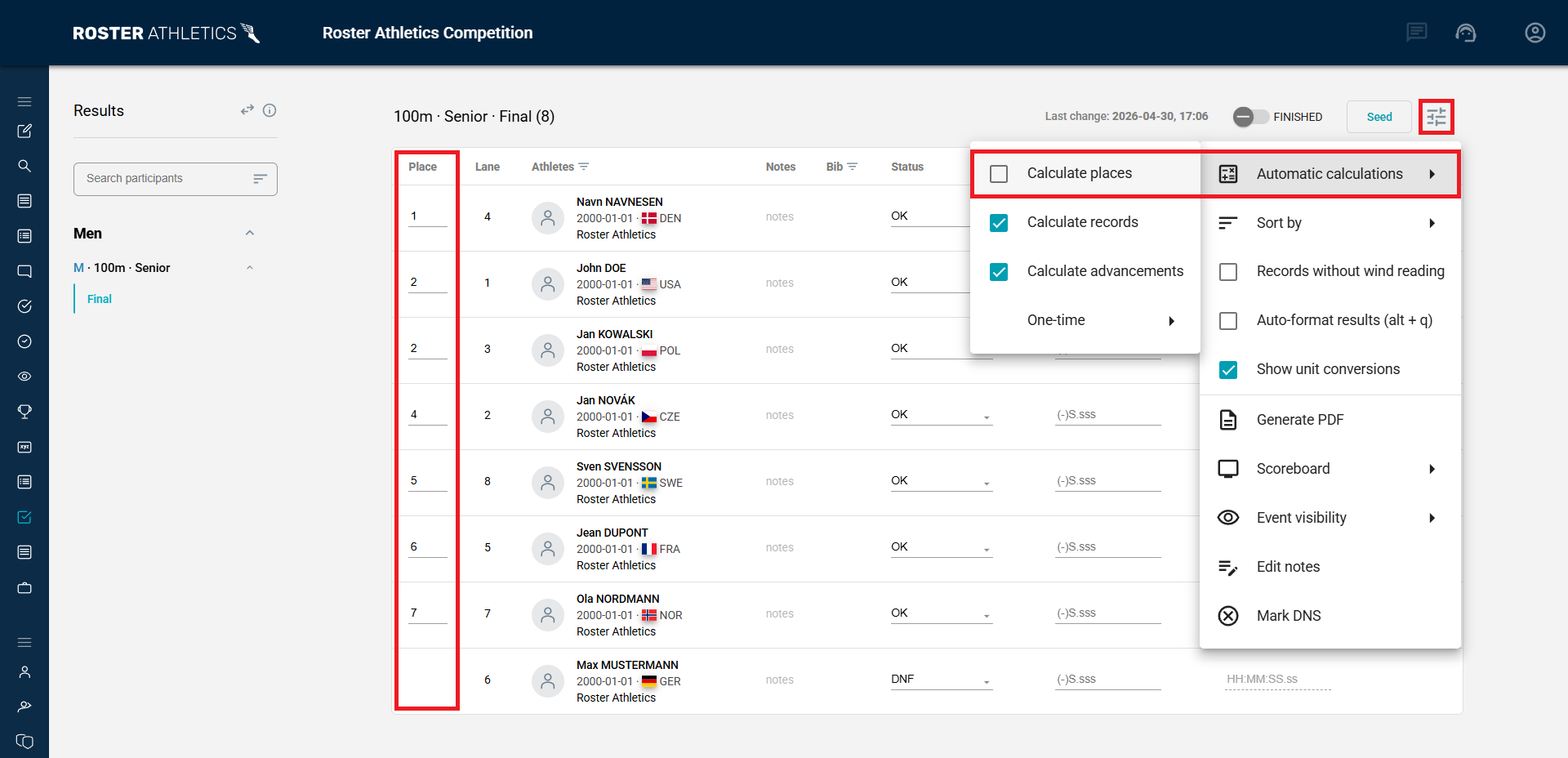
You can manually adjust rankings for any event at any time. To do this, go to the results section of the admin panel and turn off Automatic calculations → Calculate places in the event settings. This will make the places editable.
Athlete profiles
Q: A competitor entered the competition with an incorrect date of birth. How can I change it?
If you have permission to edit athlete profiles, you can update the date of birth directly in the athlete's profile.
If you do not have permission, a regular user or organiser cannot change the athlete's date of birth. In that case, please report the error to support@rosterathletics.com, and the support team will assist.
Organisation
Q: How do I add a new user to my organisation?
To add a new user, please send the following information to support@rosterathletics.com:
- Organisation name
- New member's first and last name
- New member's email address
- Role(s) you would like to assign to the new user
Related user guides: